
Updated on: March 10, 2026
Whether you pull casually or plan every banner, a Genshin wish counter keeps your numbers straight. It turns your wish history into clear pity totals you can actually use—separate for Character Event, Weapon Event, and Standard banners (plus any special ones). That way, you’ll know where your 50/50 stands and how close you are to a guaranteed 5-star, without guessing. It also makes weapon tracking easier by explaining the Epitomized Path in plain language. Since the in-game History view only shows about one year of pulls (updated in Version 4.5), importing and backing up regularly matters if you want lifetime tracking. Done right, you’ll plan smarter, save Primogems, and pull with more confidence.
Quick Answer
A genshin wish counter reads your wish history and shows current pity per banner. Character pity guarantees a 5-star by 90 pulls, while weapon pity guarantees by 80. Counters work by importing your history, then updating as you pull. Character banner rules. Weapon banner overview.
Table of Contents
- What Is a Genshin Wish Counter?
- How Character Banner Pity and the 50/50 Work
- Weapon Banner Pity and Epitomized Path
- Standard Banner Rules and Carryover
- Soft Pity vs. Hard Pity Explained
- Check Pity In-Game Using Wish History
- Export and Back Up Your Wish History
- Use Paimon.moe to Track Pity (Step-By-Step)
- Track Wishes with Genshin Wizard (Discord)
- Other Wish Counters: Stardb, Genshin-Wishes, Tally Sheets
- Chronicled Wish and the 1-Year History Change
- Safety and Privacy: Are Wish Counters Safe?
- Migrate Old Data Between Tools
- Troubleshoot Missing or Delayed Wish History
- Plan Smarter Pulls with Your Counter
- Myths and Misconceptions About Pity
TL;DR
• Counters read wish history and show pity.
• Character pity caps at 90 pulls.
• Weapon pity caps at 80 pulls.
• Export history and back it up.
• Use trusted tools with privacy controls. Official update notes.
What Is a Genshin Wish Counter?

A wish counter turns your scattered logs into simple pity tracker numbers. It reads wish history and separates counts by banner count for clarity. Tools like Paimon.moe or Stardb automate this process, then keep running totals. Paimon.moe Wish Counter.
• Shows current pity per banner
• Highlights last 5-star pull
• Tracks 50/50 state information
• Adds lifetime pull statistics
• Displays banner-specific counters
• Updates after each import
• Works with PC, mobile, and console
• Keeps a private local view
• Supports data migration later
• Helps plan future pulls
• Reduces manual counting errors
• Saves time versus spreadsheets Wish Tracker overview.
How Character Banner Pity and the 50/50 Work

Character event pity guarantees a 5-star by 90 pulls. However, the guarantee still respects the featured character 50/50 rule. If you lose once, your next 5-star is guaranteed featured. Character mechanics description.
• Separate pity from other banners
• Counter resets after any 5-star
• 4-star guarantee exists at 10
• 50/50 applies to featured unit
• Lose once, next is guaranteed
• Pity increases odds near cap
• Soft pity rises before 90
• Wish history confirms intervals
• Counters track guarantee state
• Logs reduce guesswork
• Good for budgeting primogems
• Useful for rerun planning Character wish rules (summary).
Weapon Banner Pity and Epitomized Path
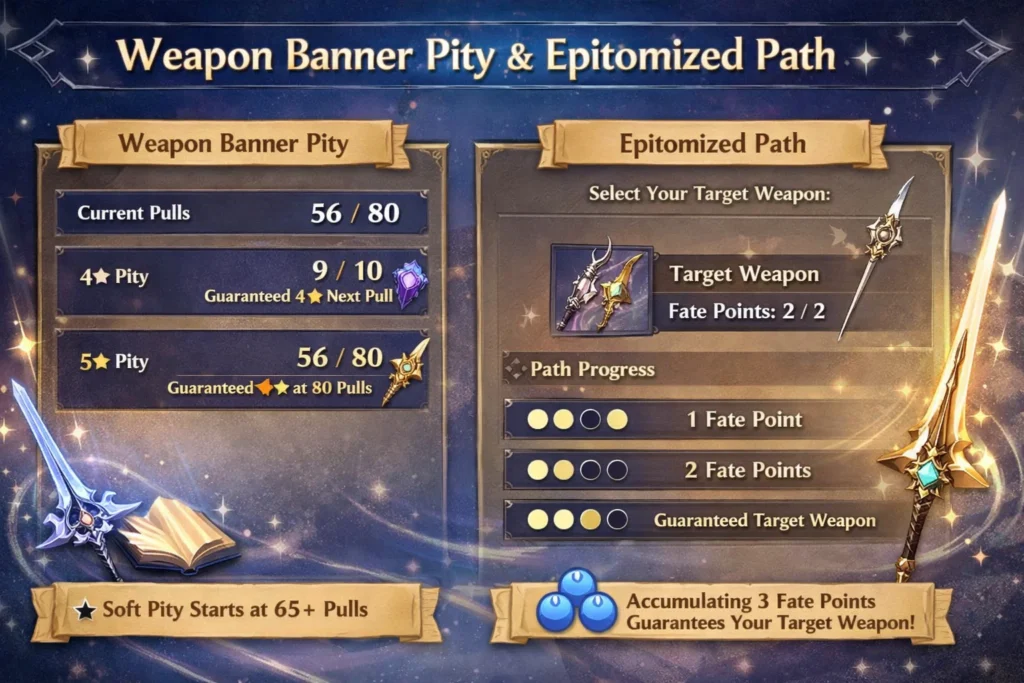
Weapon pity guarantees a 5-star by 80 pulls. The Epitomized Path uses fate points to secure your chosen weapon. You set a path, miss once or twice, then receive your pick. Weapon banner guide.
• 5-star guaranteed by 80
• Two featured 5-star weapons
• Chart a course for one
• Gain fate points on misses
• Two points force your choice
• Counters display fate points
• Separate pity from characters
• 4-star guarantees still apply
• Path resets on banner change
• Import keeps your history
• Plan resin and builds sooner
• Avoid overspending primogems Epitomized Path explainer.
Standard Banner Rules and Carryover
The permanent banner uses the same 90-pull guarantee. However, counters and pity are separate counters from limited banners. Pity does not cross between banner types. General wish rules.
• Standard includes weapons and characters
• 5-star guaranteed by 90
• 4-star guaranteed by 10
• No featured 50/50 system
• Counters stored for this banner
• Limited and standard are separate
• Counter resets on each 5-star
• Tools track all three banners
• History shows full sequence
• Useful for counting starglitter
• Good for new player planning
• Keep expectations realistic Overview page.
Soft Pity vs. Hard Pity Explained
Hard pity is the fixed cap guarantee. Soft pity is the rising chance near the cap. Tools reflect both by showing pulls since last 5-star. Pity explanation overview.
• Hard pity is 90 or 80
• Soft pity starts earlier
• Odds rise near the cap
• Counters show current pull
• Soft pity is not a reset
• Use it to pace wishes
• Delay pulls until closer
• Watch weapon banner early
• Remember separate banners
• Keep proof with export logs
• Expect variance regardless
• Guarantees still govern results Character mechanics context.
Check Pity In-Game Using Wish History
You can open each banner’s wish history and count pulls. Then you can import the same pages into tools later. The steps are simple across devices. Basic how-to.
• Open the wish menu
• Click History on the bottom
• Choose the banner tab
• Count since the last 5-star
• Repeat for each banner
• Note 4-star intervals too
• Avoid closing between pages
• Check all pages to the end
• Record the final page number
• Compare to your counter
• Confirm the 50/50 state
• Update after new wishes Delay note.
Export and Back Up Your Wish History
Exports keep your records beyond game retention. Paimon.moe provides clear import screens and optional Drive sync backups. Many sheets accept UIGF‐style files. Paimon.moe Import.
• Copy the history link first
• Select your correct server
• Paste link into the importer
• Verify each banner section
• Save a local CSV or Excel
• Enable Drive sync if desired
• Keep files by version
• Protect your account tokens
• Avoid sharing raw links
• Re-import after major pulls
• Test a restore on another tool
• Keep one master backup Wish Tally sheet purpose.
Use Paimon.moe to Track Pity (Step-By-Step)
Paimon.moe is a popular auto import tool with a clean dashboard. It calculates pity, 50/50 state, and statistics per banner. The setup takes minutes. Wish Counter.
• Open Wish Counter page
• Click Auto Import workflow
• Select server and platform
• Paste your history link
• Wait for the status check
• Review character banner pity
• Review weapon pity values
• Review standard pity next
• Confirm lifetime pull stats
• Enable Google Drive sync
• Re-import after every session
• Use data for planning Import guide.
Track Wishes with Genshin Wizard (Discord)
Genshin Wizard tracks wishes through a website or bot. It offers privacy controls, migration, and validation for each wish. The docs explain every step. Genshin Wizard FAQs.
• Add your game account
• Link wish history securely
• Hide stats if you prefer
• Import from Paimon.moe
• Validate duplicates safely
• View pity per banner
• Share summaries with friends
• Keep logs synced via Discord
• Migrate again if needed
• Remove data at any time
• Report issues in support
• Check bot status updates Genshin Wizard site.
Other Wish Counters: Stardb, Genshin-Wishes, Tally Sheets
You also have solid alternatives. Each handles importer steps differently and suits different preferences. Pick the flow you prefer. Stardb Wish Tracker.
• Stardb shows a fast timeline
• Filters by rarity and type
• Simple import instructions
• Genshin-Wishes provides backup
• Easy migration from older saves
• Good for multi-device viewing
• Wish Tally stores everything
• Spreadsheet comparison views
• Shares stats with friends
• Low overhead solutions
• Keep multiple backups
• Mix tools without lock-in Genshin-Wishes origin post. Wish Tally sheet.
Chronicled Wish and the 1-Year History Change
Version 4.5 introduced Chronicled Wish and extended visible history to one year. This helps counters show more accurate streaks. Official 4.5 notes.
• Chronicled Wish has its own rules
• 90 wishes still guarantee a 5-star
• History retention is now one year
• Older posts mention six months
• Tools updated their guidance
• Re-export after the change
• Verify your oldest entry date
• Keep a local backup anyway
• Migration is simpler now
• Plan longer pity tracking
• Use counters for reruns
• Confirm rules before each patch Rules & FAQ summary.
Safety and Privacy: Are Wish Counters Safe?
Reputable tools use a read-only request against the official history endpoint. Leading services add data validation and privacy toggles. Always avoid sharing tokens. Genshin Wizard safety note.
• Never share your account password
• Use trusted, documented tools
• Prefer open docs and audits
• Revoke links you no longer use
• Avoid public paste sites
• Back up to private storage
• Keep files off shared drives
• Delete old exports you publish
• Use privacy settings for sharing
• Confirm phishing protection
• Report suspicious prompts
• Rotate links after device changes Genshin Wizard FAQs.
Migrate Old Data Between Tools
Most platforms support CSV or UIGF imports. You can export from one tool, then deduplicate entries on import. Community notes outline simple steps. Migration tip thread.
• Export from the source tool
• Keep the original file safe
• Import into the new tool
• Match servers and regions
• Check banner type mapping
• Remove accidental duplicates
• Verify oldest and newest dates
• Compare pity before/after
• Keep both backups briefly
• Switch your active tracker
• Document your steps
• Recheck after next banner Older method thread.
Troubleshoot Missing or Delayed Wish History
Sometimes history updates slowly on the server. Wait a bit, then refresh and re-import. Pagination errors can also hide last pages. Delay guidance.
• Wait 30–60 minutes first
• Reopen the wish menu
• Switch banner tabs once
• Scroll to the final page
• Copy a fresh history link
• Re-paste into your tool
• Confirm the server field
• Try another browser profile
• Clear a stale cache entry
• Test a second tool briefly
• Compare total counts
• Save logs after fixing Paimon.moe Import.
Plan Smarter Pulls with Your Counter
A counter helps decide when to pull or wait. Use primogem budget notes and guarantee states to time wishes. The rules stay consistent. Character rules.
• Track each banner separately
• Note 50/50 or guaranteed
• Estimate soft pity windows
• Save for favored reruns
• Use Epitomized Path wisely
• Avoid splitting resources
• Schedule resin and builds
• Log wishes after sessions
• Set a monthly gem cap
• Keep starglitter plans
• Stop at safe thresholds
• Review history before banners Weapon overview.
Myths and Misconceptions About Pity
Many rumors confuse players. Your counter clears myths with real counts and rules. Check official notes when unsure. 4.5 history change.
• Pity does not cross banner types
• 50/50 applies to featured units
• Soft pity is not a secret reset
• Counters do not change odds
• Exports do not risk bans
• Weapon path needs fate points
• Standard banner lacks featured 50/50
• Old six-month limit is outdated
• History still needs backups
• Wish simulators are separate
• Counters are read-only tools
• Always verify after patches Character mechanics.
FAQs
How do I check pity quickly?
Open the wish menu, select History, then count since your last 5-star. A counter automates the math after import. Basic how-to.
Does pity carry over between banners?
Pity is separate for character, weapon, and standard banners. It does not carry across types. General rules.
What’s the difference between 80 and 90 pity caps?
Weapon pity guarantees a 5-star by 80 pulls. Character and standard banners guarantee by 90 pulls. Weapon guide. Character mechanics.
Is using a wish counter safe?
Reputable tools read your history via a link and don’t need your password. Many offer privacy controls and migration tools. Genshin Wizard safety. Wizard FAQs.
How long does the game keep my wish history?
Version 4.5 increased visible history to one year. You should still export for long-term archives. Official update notes.
What is Epitomized Path?
It’s the weapon banner’s fate point system. Miss your chosen weapon twice, then the next 5-star is guaranteed to be it. Epitomized Path explainer.
Conclusion
A good Genshin wish counter turns random pulls into clear pity totals you can actually plan around. When you track pity by banner, understand your 50/50 status, and keep regular backups of your wish history, you stop guessing and start making smarter decisions with your Primogems. Use the counter before every banner, check your numbers after each pull session, and save your data so you don’t lose progress. With a little consistency, you’ll pull with more confidence—and enjoy every 5-star win even more.

Marcus is a Chicago–based writer focused on success, goals and milestones. At Wishexx, he writes uplifting congratulations wishes for exams, graduations, new jobs, promotions and business wins that honour hard work and inspire the next step.